 iPadKiosk
What changed: from touchscreen to conversation
For fifteen years, a kiosk was a decision tree with a glass front: designers guessed every question a visitor might have and drew a screen for each one. That model had a ceiling — the moment a visitor's question wasn't on the menu, the kiosk failed and a staff member got interrupted.
Large language models removed that ceiling. A kiosk grounded in your business's actual information — your products, your hours, your building, your policies — can now answer the questions you didn't predict, in whatever language the visitor speaks, at 2 a.m., without ever getting tired of being asked where the bathroom is. That's the entire shift: from navigation to conversation.
What hasn't changed: the iPad is still the best kiosk hardware for most businesses — cheap relative to custom kiosk terminals, reliable, familiar to every visitor, and lockable into a single app. (New to that part? Start with our complete guide to iPad kiosk mode.)
What an AI kiosk actually is (and isn't)
Strip away the marketing and an AI kiosk is three specific capabilities added to a normal interactive kiosk:
- Open-ended Q&A — visitors ask in plain language; the kiosk answers from a curated knowledge base about your business (not from the open internet).
- Guidance — the conversation ends somewhere useful: a product page, a booking, a map, a human.
- Language flexibility — the same kiosk serves visitors in dozens of languages without anyone building "the Spanish version."
And here's what an AI kiosk isn't: it isn't a chatbot bolted onto a screen with access to the whole internet. An ungrounded model will happily improvise your store hours. The difference between a demo and a deployment is grounding — the AI answers only from your content, says "let me get you a person" when it doesn't know, and never freelances.
The one-sentence test: if you can list every question your visitors will ask, you don't need AI — you need good interactive content. If you can't, that's exactly where AI earns its place.
The 2026 AI kiosk stack, layer by layer
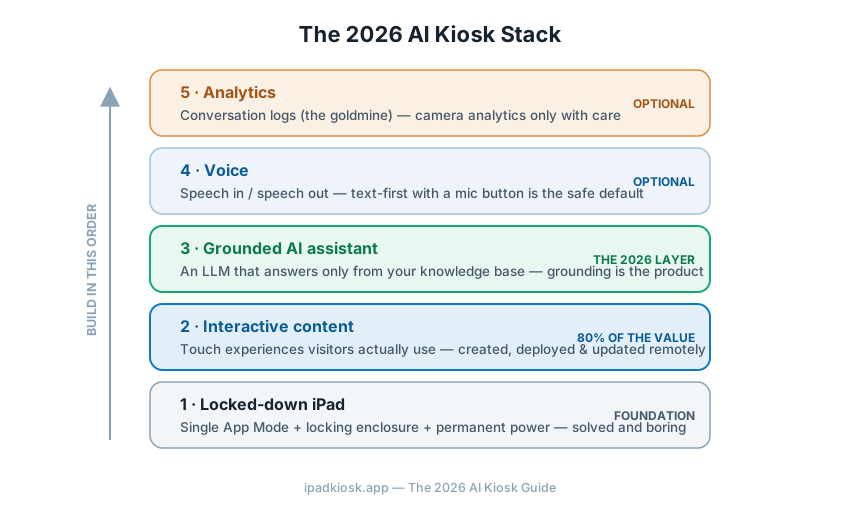
Locked-down iPad
Single App Mode on a supervised iPad, in a locking enclosure, on permanent power. This layer is solved and boring — exactly what you want from a foundation. Full setup guide here.
Interactive content
The screens visitors actually see: galleries, videos, product tours, menus, maps. This is still where 80% of kiosk value lives — AI or not — and it's what platforms like Flow Kiosk let you create, deploy and update remotely across a fleet without code.
Grounded AI assistant
A language model connected to your knowledge base — product specs, FAQs, policies, local recommendations. Modern models handle this reliably when properly grounded; usage pricing means a typical kiosk's conversation volume costs tens of dollars a month, not thousands.
Speech in, speech out
Speech recognition is finally good enough for lobbies — but think hard about whether your space suits people talking to a screen. Voice shines in hotel lobbies and visitor centers; it's awkward in quiet waiting rooms. Text-first with a microphone button is the safe default.
Understanding usage
Conversation logs are a goldmine: every question visitors ask is free market research. Review them weekly. Camera-based analytics (footfall, dwell time) exist but carry real privacy obligations — in many jurisdictions, biometric analysis triggers consent requirements. Most businesses get 95% of the value from conversation logs alone.
Where AI kiosks genuinely work today
The AI concierge (hotels, apartments, visitor centers)
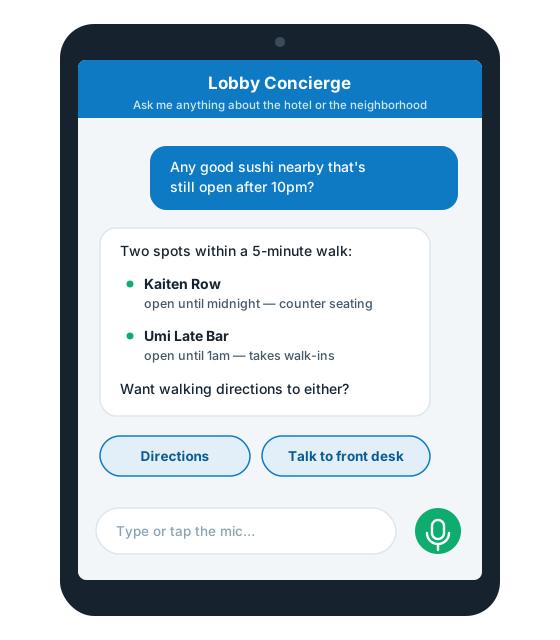
The strongest use case in 2026. An AI concierge kiosk in a lobby answers the questions front desks answer a hundred times a day — "where should we eat?", "how do I get to…?", "what time does…?" — in the guest's own language, with recommendations you curated. Hotels report the win isn't replacing the concierge; it's that the desk finally has time for the requests that need a human. A digital concierge also never goes off shift: the 11 p.m. check-in gets the same answers as the 2 p.m. one.
The virtual receptionist kiosk (offices, clinics, coworking)
Visitor check-in, badge printing, host notification, deliveries, directions. The AI layer handles the edge cases that break rigid check-in flows — "I'm here for an interview but I don't know who with" — gracefully instead of dead-ending.
The retail & showroom advisor
An iPad beside the product that can compare models, check what's in stock, and answer spec questions — the associate's knowledge, available even when every associate is busy. Works best when it ends conversations with a concrete next step: "want me to call someone over?"
Museums & attractions
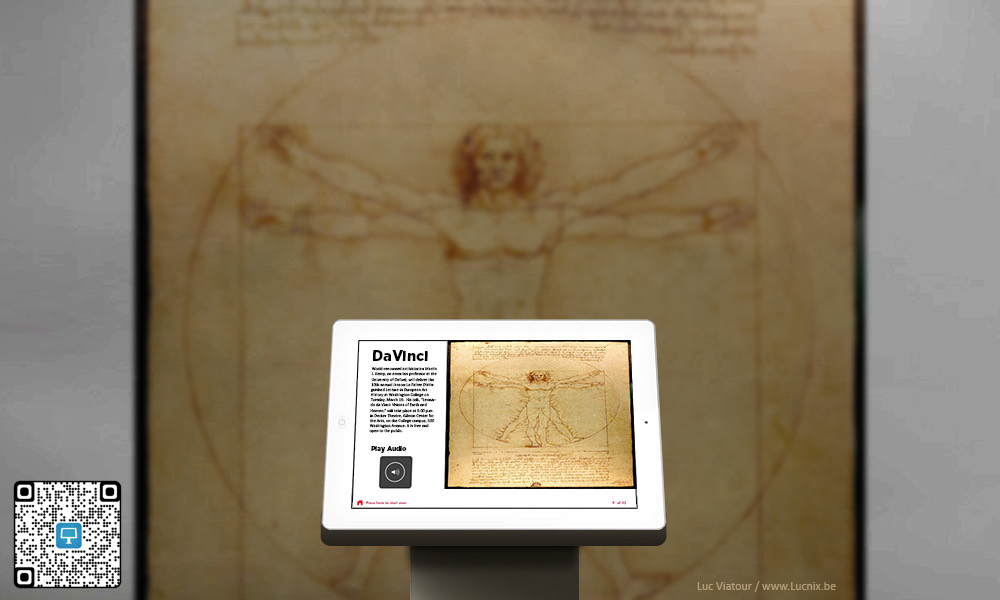
Exhibit Q&A in any language, depth on demand — the visitor who wants thirty seconds gets thirty seconds, the one who wants ten minutes gets ten minutes. Static placard, infinite depth.
The AI receptionist question
"Can an AI receptionist replace our front desk?" is 2026's most-asked kiosk question, so here's the honest answer: it replaces the routine 80% — check-ins, directions, FAQs, after-hours coverage — and it must not replace the other 20%: security judgment, upset visitors, exceptions, anything with legal weight.
The deployments that work share one design rule: the human handoff is one tap away and genuinely fast. An AI receptionist that traps people in a conversation loop is worse than a sign with a phone number. Design the escape hatch first, then make the AI good enough that people rarely need it.
Layer 2 is where every AI kiosk starts
Before the conversation layer, you need the kiosk itself: interactive content, deployed to locked-down iPads, updatable from anywhere. That's Flow Kiosk — the easiest way to create, deploy and manage interactive iPad kiosks.
Start with Flow Kiosk →A practical build path (start here)
- Deploy a great non-AI kiosk first. Locked-down iPad, interactive content, remote management. This alone solves most of what visitors need, and it's live in a day.
- Collect the questions. Put a "couldn't find what you need?" prompt on the kiosk. For a few weeks, gather what visitors actually ask — this becomes both your business case and your AI's knowledge base.
- Write the knowledge base. Answer the top 50 real questions in plain language. This document is 80% of your AI quality; the model is the other 20%.
- Add grounded Q&A. Connect an LLM that answers only from your knowledge base, refuses gracefully, and hands off to a human on request.
- Read the logs weekly. Every unanswered question is a knowledge-base edit. The kiosk gets smarter at the speed you read.
Notice what this path avoids: no custom hardware, no six-month project, no betting the lobby on day-one AI. Each step is useful even if you stop there.
What it really costs
| Component | Typical cost (2026) | Notes |
|---|---|---|
| iPad | $350–$800 | Kiosk duty is light; base models and refurbs do fine |
| Locking enclosure / stand | $150–$600 | Countertop, floor, or wall — buy for your exact model |
| Kiosk software | Subscription | Content creation, fleet deployment, remote updates |
| AI usage | Tens of $/month | Kiosk conversation volume is small; usage-priced models are cheap at this scale |
| Custom kiosk terminal (the alternative) | $5,000+ per unit | Before software — the comparison that makes iPads the default |
Five ways AI kiosk projects fail
- Ungrounded AI. A model with no knowledge base will invent answers with total confidence. Grounding isn't optional; it's the product.
- AI as the only interface. Most visitors want to tap, not chat. Lead with great touch content; offer conversation for everything else.
- No human escape hatch. The fastest way to make people hate your lobby.
- Nobody owns the logs. An AI kiosk unread is an AI kiosk unimproved. Assign the weekly log review to a person, by name.
- Privacy as an afterthought. Disclose that visitors are talking to an AI, don't store conversations longer than needed, and treat cameras as a legal question before a technical one.
Frequently asked questions
What is an AI kiosk?
A self-service kiosk that can hold a conversation instead of only offering buttons — visitors ask questions in plain language and it answers from a knowledge base about your business, then guides them to the right content or action. In 2026, most are built by pairing an interactive kiosk app on a locked-down iPad with a grounded language model.
What is an AI concierge?
An AI kiosk deployed in hospitality and visitor spaces — hotel lobbies, apartment buildings, visitor centers — answering guest questions, making curated recommendations, and handling routine requests conversationally, 24/7, in the guest's language.
Can an AI kiosk replace a receptionist?
It replaces the routine 80% — check-ins, FAQs, directions, after-hours coverage — and should never replace the judgment calls. The deployments that work keep a fast, obvious path to a human.
How much does an AI kiosk cost?
Roughly $700–$1,500 in hardware (iPad + enclosure), a kiosk software subscription, and AI usage that typically amounts to tens of dollars monthly at kiosk conversation volumes — versus $5,000+ per unit for custom kiosk terminals.
Do I need AI on my kiosk at all?
Not always. If every visitor need is predictable, well-designed touch content is faster than conversation. AI earns its place when questions are open-ended, varied, or multilingual. Start with content, add AI where the real questions demand it.
What iPad setup does an AI kiosk need?
The same foundation as any kiosk: a supervised iPad in Single App Mode, a locking enclosure, and permanent power. Our iPad kiosk mode guide covers the full setup step by step.
Build the kiosk. Then make it smart.
Flow Kiosk gets your interactive iPad kiosks live today — created once, deployed everywhere, updated from anywhere.
Get started with Flow Kiosk →